My account
Registering for MyAccount is easy and can be completed in a few easy steps.
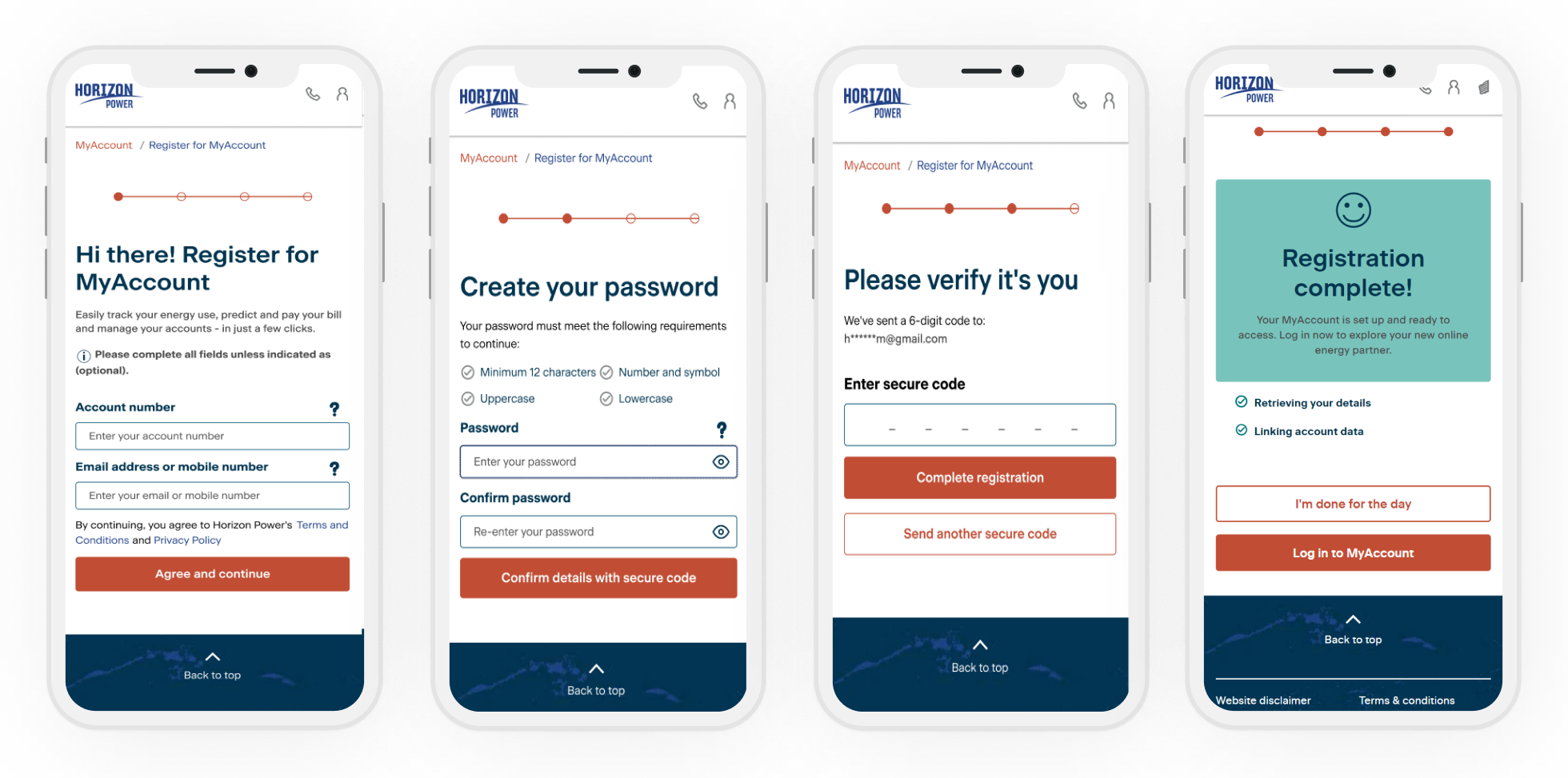
Visit login.horizonpower.com.au/register-for-myaccount and:
Visit login.horizonpower.com.au/register-for-myaccount and:
- Enter your account number (you'll find this printed on your electricity bill in the top right-hand corner) and the email address or primary mobile number that you have linked to your account.
- Set a secure password.
- Confirm it’s you by entering the one-time code we’ll send to your email or mobile.
Your account number is printed on your electricity bill in the top right-hand corner. If you don’t have a copy of a previous bill handy, please contact us for assistance.
Registering with MyAccount should only take a few minutes.
Please have your account number handy (you'll find this printed on your electricity bill in the top right-hand corner) and the email address or primary mobile number that you have linked to your account.
Please have your account number handy (you'll find this printed on your electricity bill in the top right-hand corner) and the email address or primary mobile number that you have linked to your account.
If you need to update the email address and phone number you use to log in, please contact us for assistance. Or you can submit a request to update your contact information, including your email address and phone number, in the Self serve section of MyAccount.
You can reset your password at any time by visiting login.horizonpower.com.au/reset-forgotten-password
You can reset your password at any time by visiting login.horizonpower.com.au/reset-forgotten-password
Register for MyAccount with one of your accounts - using the 6 digit account number and the email address or mobile number that you have linked to your account.
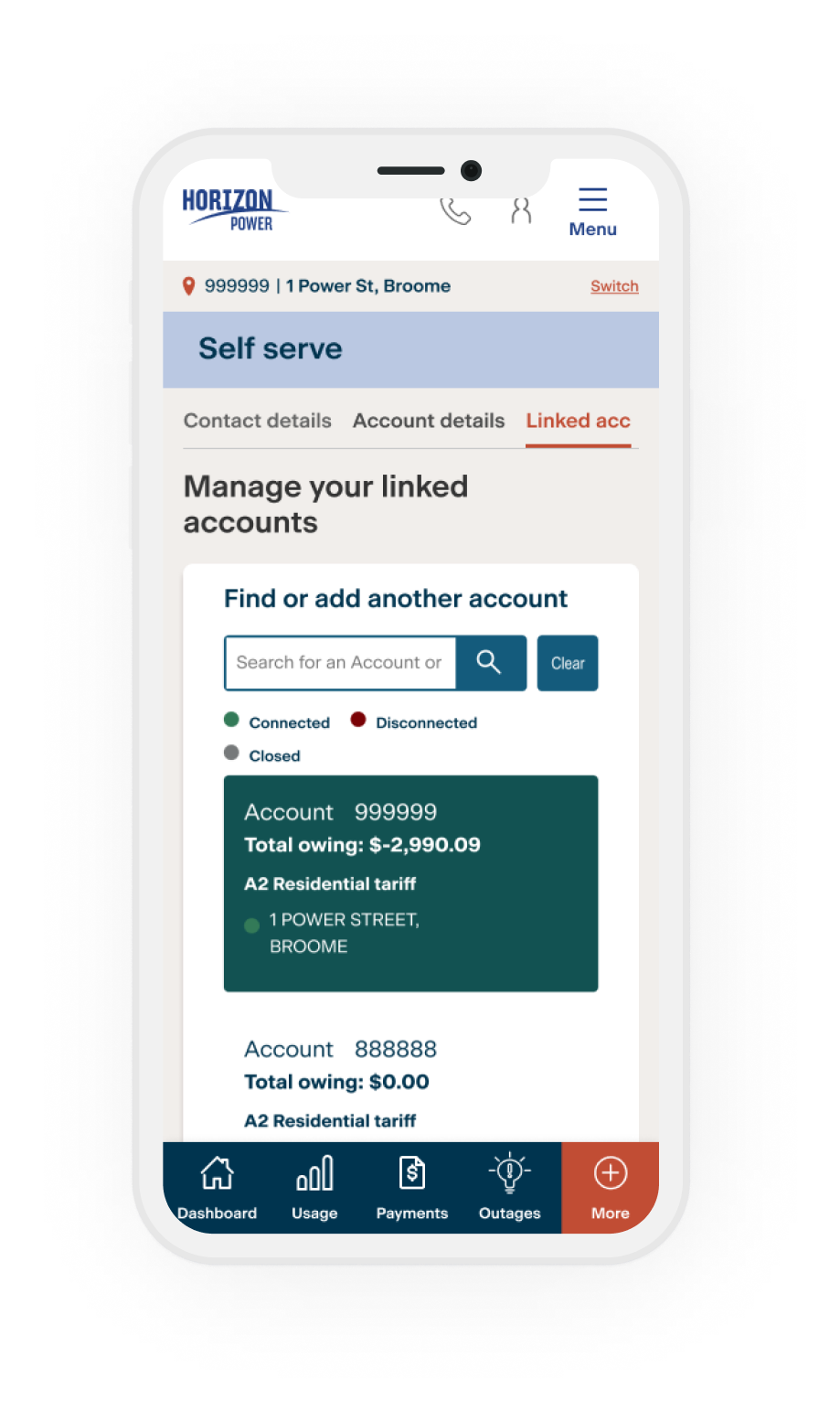
- Once you log in, you can easily add all your other accounts in the Self Service section.
- Select More from the menu
- Then select Self service link
- And then tap Link another account
You’ll need your other account numbers handy, plus the account holder's name - exactly as it appears on the bill.
Account details
You can reset your password at any time by visiting login.horizonpower.com.au/reset-forgotten-password
We’ll need to confirm it’s you by sending a one-time code to your registered email address or mobile number.
We’ll need to confirm it’s you by sending a one-time code to your registered email address or mobile number.
Yes. You can submit a request to update your contact information, including your email address and phone number, in the Account Details section of MyAccount.
After you register and log in with one of your accounts, you can link your other accounts in the Account Details section of MyAccount. To do this you’ll need your other account numbers handy, and the account name exactly as it appears on your bill.
Yes, we can notify you when your bill or direct debit payment is due and if your estimated energy charges reach a set amount. Visit the Message Centre in MyAccount to manage your notification preferences and view your notification history.
If you are a residential customer, you can add your concession cards to your account using the Concessions & Rebates form located on the Dashboard. We’ll let you know which concessions you may be eligible for and how much you are likely to receive.
If you hold multiple cards, you'll need to add each of them separately.
If you hold multiple cards, you'll need to add each of them separately.
Visit the Help Centre in MyAccount and complete the online form to let us know if you’re moving in or out of a property.
Visit the Account Details section of MyAccount to view the account details, including supply address, electricity tariff, meter number/s and any rebates or subsidies you are receiving.
Billing & payments
You can pay your bill with a credit or debit card by logging in to MyAccount or by using the pay online form. If you’re logged in, the form will prepopulate with your account number and the current amount owing on that account – which you can amend if you need to. After you make a payment, we’ll email you a copy of your payment receipt for your records.
Visit the Payments section of MyAccount to view and update your payment preferences including signing up for Direct Debit or if you need to cancel any existing arrangements.
Direct Debit is the set and forget way to keep on top of your bill payments:
Direct Debit is the set and forget way to keep on top of your bill payments:
- Pay your bill in full whenever it’s due
The total amount due will be automatically deducted from your credit or debit card or bank account on the payment due date. - Make smaller, regular payments along the way - so it's easier to budget for your energy costs
You get to choose the day, how much and how often. Chip away at your bill every week, fortnight or month. It's easier to align to your pay cycle or budget because you can choose the day to deduct the payment from your account.
Visit the MyAccount Dashboard to view the current account summary, including your latest bill and due date.
If you need a little more time to pay your bill - you may be eligible for a payment extension. Select the ‘More time to pay’ button to see what payment extensions or arrangements that could be available to you.
If you need a little more time to pay your bill - you may be eligible for a payment extension. Select the ‘More time to pay’ button to see what payment extensions or arrangements that could be available to you.
Yes. You can pay any bill with a credit or debit card if you have the account number handy. To access the payment form, you can either log in to MyAccount (remember to update the account number) or use the pay online form on our website.
Visit the Payments section of MyAccount to view and update your payment preferences including signing up for direct debit and cancelling any existing direct debit arrangements.
To update an existing direct debit, including your bank account or credit card details, you will need to cancel your existing direct debit arrangement and set up a new one using the Direct Debit online form.
To update an existing direct debit, including your bank account or credit card details, you will need to cancel your existing direct debit arrangement and set up a new one using the Direct Debit online form.
Visit the Payments section of MyAccount and select the History tab to view your billing and payment history and to download your previous bills.
Yes. You can set a spend goal for your account and we will notify you (by SMS or email) when your current energy charges reach 50% or 100% of this amount during the current bill period. Your notification will be sent to your account-registered mobile number or email address - so please check your details are up to date.
Outages
If your power goes out, it’s a good idea to check your switchboard fuse box to see whether any of your safety switches (known as Residual Current Devices or RCDs for short) have tripped and check your mains switch is in the ON position.
If everything looks ok, check the outage finder in MyAccount for updates on the latest planned and unplanned outages and when we expect to restore power. Select the ‘Outages affecting my property’ option to filter the outages relevant to you.
Please call our 24/7 hotline on 13 23 51 to report all faults and outages.
If everything looks ok, check the outage finder in MyAccount for updates on the latest planned and unplanned outages and when we expect to restore power. Select the ‘Outages affecting my property’ option to filter the outages relevant to you.
Please call our 24/7 hotline on 13 23 51 to report all faults and outages.
Check the outage finder in MyAccount for a list of planned outages. Select the ‘Outages affecting my property’ option to filter the outages relevant to you.
Unless it’s an emergency, we'll let you know at least three days before a planned power interruption.
Unless it’s an emergency, we'll let you know at least three days before a planned power interruption.
Prepaid meters
Visit the Help Centre in MyAccount to submit an enquiry or phone our dedicated prepayment hotline Monday to Friday 8am- 5pm on 1800 447 707.
You can add credit to any Prepaid Power meter with a credit or debit card if you have the account number handy.
To access the payment form, you can either log in to MyAccount or use the pay online form on our website.
To access the payment form, you can either log in to MyAccount or use the pay online form on our website.
OLD ImageTileBlock - Replace with Media Split Block
Usage
Visit the Usage section in MyAccount to see your usage history. Usage data updates every morning so you can switch between the latest day, week, month, bill period and year. The daily view provides a rolling 30-day history that displays hourly usage over the day.
If you have linked accounts, each of your meters will display together on the aggregated usage graph.
You can download up to 365 days of your usage data using the Interval data form.
If you have linked accounts, each of your meters will display together on the aggregated usage graph.
You can download up to 365 days of your usage data using the Interval data form.
Visit the Usage section in MyAccount to see your usage history. The Interval data form lets you download or email up to 365 days of your hourly and/or daily usage data (in Excel format).
The estimated energy charges amount is based on how many units of electricity you have used so far in the current billing period. The current spend is calculated based on your tariff and fixed supply charge.
We then use your current usage behaviour to predict what your next bill is likely to be. The estimated next bill is an estimate only and will become increasingly accurate as the end of the billing period approaches. Where applicable, this calculation includes solar buyback credits, concessions or rebates applied to your account and any outstanding debts.
Please note: The figure shown can vary due to factors such as actual usage and the proportion of the bill that is based on a fixed vs variable charge e.g., smaller bills will have a bigger proportional fixed charge. All amounts shown are inclusive of GST.
We then use your current usage behaviour to predict what your next bill is likely to be. The estimated next bill is an estimate only and will become increasingly accurate as the end of the billing period approaches. Where applicable, this calculation includes solar buyback credits, concessions or rebates applied to your account and any outstanding debts.
Please note: The figure shown can vary due to factors such as actual usage and the proportion of the bill that is based on a fixed vs variable charge e.g., smaller bills will have a bigger proportional fixed charge. All amounts shown are inclusive of GST.
Horizon Power acknowledges the Traditional Custodians throughout Western Australia and their continuing connection to the land, waters and community. We pay our respects to all members of the Aboriginal communities and their cultures; and to Elders past, present and emerging.
Aboriginal and Torres Strait Islander people are advised that this website may contain images, names or voices of deceased people.